MSFS 2024 pop-outs: the frame rate cost, and the screens that won't pop out
Popping out glass screens in Microsoft Flight Simulator 2024 costs frame rate, because the sim keeps drawing every pop-out window, many times a second. And some screens, like the A320neo's and the 737 MAX's, can't be popped out on their own at all. PanelSight 1.2.0 avoids both problems: it copies the screens straight from the sim, with no pop-outs, and on our test computer the effect on frame rate was too small to measure.
What pop-outs cost in frame rate
On most glass aircraft, you hold Right Alt and click a screen, such as a G1000 PFD, and the sim shows it in a window of its own that you can drag to another monitor. That window is not free. The sim draws it again and again, on top of the main view, and each screen you pop out is one more window to draw.
How much this costs depends on your computer and on how many screens you pop out. Some forum reports describe stutter when pop-outs are used together with Frame Generation. We measured it on our own test computer (an RTX 3090), with a Cessna 172 parked on the ground: popping out its two G1000 screens cost between 1% and 3% of the frame rate, in different sessions. An aircraft with more screens has more windows to draw.
Automatic pop-outs are a workaround
MSFS gives apps no official way to pop out a screen: only you can, with Right Alt and a click. So apps that pop out screens for you, PanelSight's own pop-out mode included, do it by acting like you:
- It moves the camera. The sim only pops out a screen you can see, so the app switches the view to the cockpit, and the screen flickers while the windows come up.
- It clicks for you. It sends the Right Alt click to each screen, one at a time, then finds each new window and puts it in the right place.
- It can break. If the view, the cockpit or the sim's timing is not what the app expects, a screen doesn't pop out, or pops out in the wrong place.
It works most of the time, but it is a workaround, and you see it happen every time you load a flight or change aircraft. That is why we built Direct copy, below: with it turned on, PanelSight pops nothing out, so there is no camera move, no click and no window to place.
The screens that won't pop out
A pop-out window only exists if the aircraft's designer built the screen so it can be popped out on its own. Pop-out managers and panel apps can move and resize the windows the sim makes, but they can't make a window the sim won't make. Some aircraft are affected:
- Airbus A320neo: the sim draws all of its displays, and both MCDU screens, as parts of one large picture. Even where a pop-out works, it gives you that whole picture, not the one display you clicked, so you can't put the PFD on one monitor and the ND on another.
- Boeing 737 MAX 8: in our tests, some of its screens never popped out, so the panel came up incomplete.
- Extra 330LT: its two G3X screens don't pop out at all.
No setting changes this. It depends on how each aircraft was built, and an update to the aircraft or the sim can change it.
Copying the screens instead
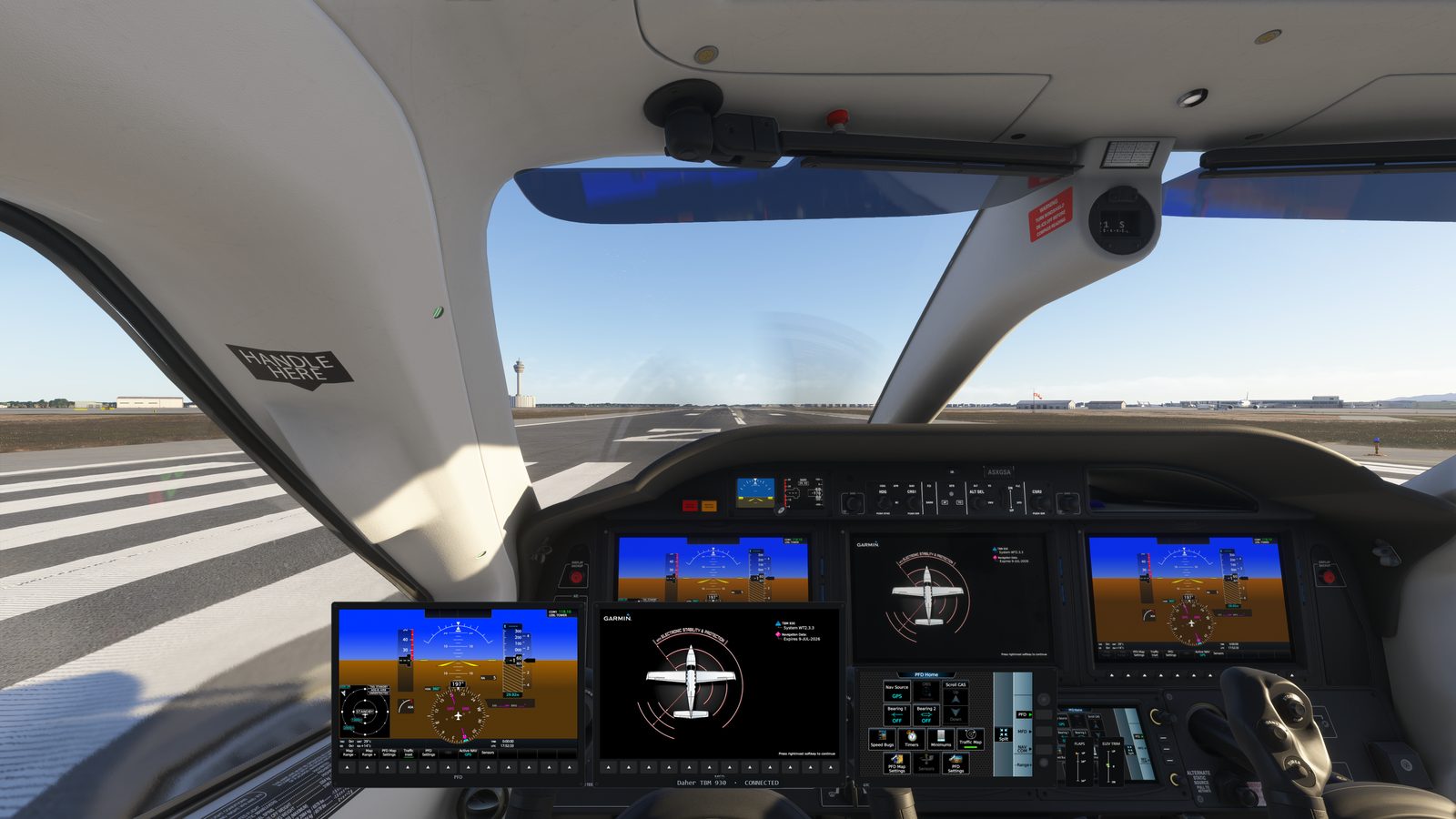
The sim draws every glass screen as a picture on the graphics card before it puts it in the cockpit, whether or not the screen can be popped out. PanelSight 1.2.0 adds a mode called Direct copy that copies that finished picture and shows it on your panel, on a spare monitor or as an overlay. There is no window for the sim to draw, so:
- its effect on the sim's frame rate is almost unmeasurable: on the same computer and Cessna 172, we measured 35.03 frames per second without PanelSight and 34.99 with Direct copy;
- nothing in the sim is moved or clicked: the camera stays where it is, and nothing flickers while the screens come up;
- it shows the screens that don't pop out, which is how PanelSight now supports the A320neo, the 737 MAX 8 and the Extra 330LT;
- it can show each display of the A320neo on its own, in the place you choose.
It is still the real screen, live: the map pans, the pages change, and what you press on PanelSight's panel is pressed in the sim.
Since PanelSight 1.2.1, Automatic uses Direct copy when your main monitor is connected to an NVIDIA graphics card, the hardware we have tested it on the most. On other graphics cards, PanelSight still uses pop-outs unless you turn Direct copy on: open Settings, go to the Glass tab and set Mirroring method to Direct copy (no pop-outs). If something looks wrong, set Mirroring method to Legacy pop-outs and click send us debug info on the About tab, so we can fix it.
The rest of PanelSight 1.2.0
Direct copy is the biggest change in 1.2.0, but not the only one. The installer is now about 7 MB, custom layouts can use every screen an aircraft has, and five aircraft, from the PA-28 Dakota to the C152, get better panels. The PanelSight 1.2.0 release notes have the details.
For other ways to get an instrument panel on a second monitor, with or without PanelSight, see 3 ways to get an instrument panel on a second monitor. For analog gauges, which never pop out, see why you can't pop out steam gauges.
Found something wrong or out of date in this article? Please let us know at contact@panelsight.net.
Try it with your own aircraft
PanelSight shows your aircraft's screens and instruments on a spare monitor, or as an overlay over the sim view, with nothing to set up. The free 7-day trial includes every aircraft and feature, and needs no payment details. The Cessna 172 (G1000) overlay is free forever.
Download the free trial